Best AI Resume Builders in 2026 to Land More Interviews
Most resumes never reach a human, filtered out by ATS software first. Here's how the top AI resume builders of 2026 actually compare on ATS pass rates and value.
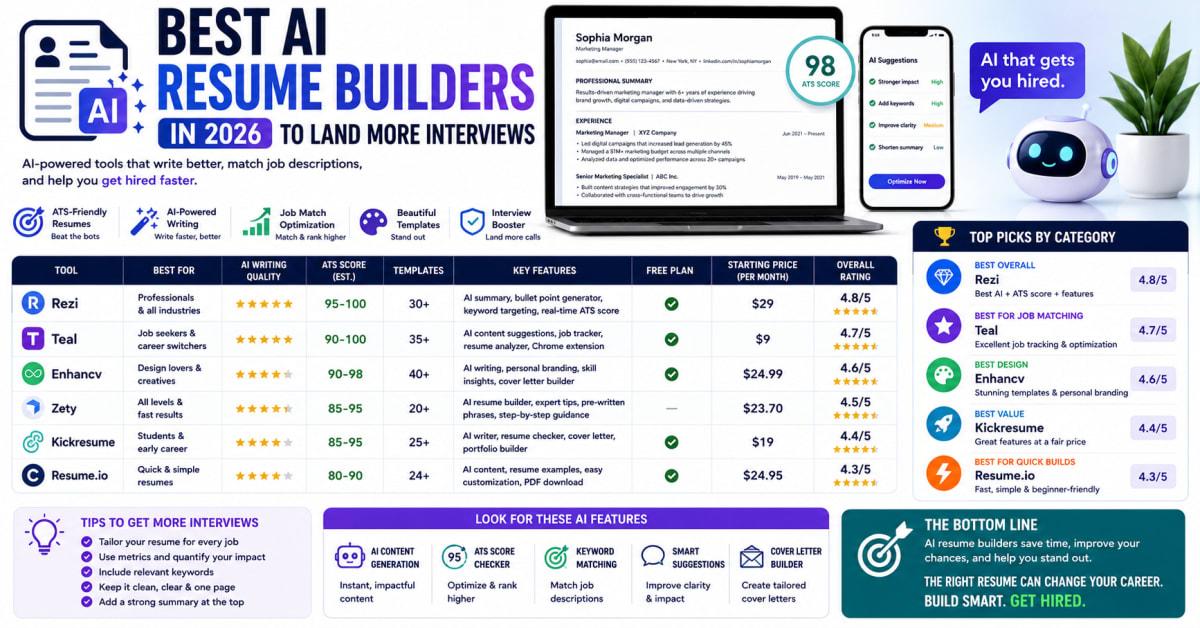
Best AI Resume Builders in 2026 to Land More Interviews
Most resumes never make it to a human reviewer. They get filtered out by applicant tracking software first, often over formatting issues that have nothing to do with a candidate's actual qualifications.
The best AI resume builders in 2026 do more than generate polished-looking text. The strongest ones are built specifically to survive the applicant tracking systems that screen resumes before a person ever sees them. This guide compares the top tools by what actually matters: ATS compatibility, content quality, and real value for what you pay.
AI Resume Builders — What They Are and Why They Matter
AI resume builders use generative AI to help draft, rewrite, and tailor resume content, often paired with applicant tracking system optimization that checks how well your resume matches a specific job posting. The strongest tools combine content generation with formatting that's actually readable by automated screening software, not just visually appealing to a human eye.
This matters because a significant share of resumes get filtered out by ATS software before any recruiter reviews them, regardless of how qualified the candidate actually is. The right tool addresses both problems: weak content and poor machine readability.
Why This Is Important Right Now
Picture a genuinely qualified candidate whose resume uses a beautiful multi-column template, only to have the ATS scramble their work history into an unreadable jumble that gets auto-rejected before a human ever opens it. That failure has nothing to do with their qualifications and everything to do with a formatting choice they didn't know mattered.
More companies have adopted AI-driven applicant tracking systems in the past year, which raises the stakes on getting formatting and keyword optimization right from the start, not as an afterthought.
Key Facts About AI Resume Builders in 2026
A few core facts explain what actually separates a genuinely useful AI resume builder from one that just looks good in a demo.
- Highly visual, multi-column templates often perform worse with ATS parsers — clean, single-column layouts consistently score better on automated readability tests.
- Resume builders and ATS scanners solve different problems — a builder generates content and design, while a dedicated scanner like Jobscan analyzes how well an existing resume matches a specific job description.
- "Free" plans vary enormously between tools — some offer genuinely unlimited resume creation, while others limit downloads or lock core AI features behind a paywall.
- Job-specific tailoring separates the strongest AI tools from generic ones — tools that read the actual job description and adjust keywords accordingly outperform those that add the same generic phrases to every resume.
- Combining a builder with a separate scanner often produces the best results — using one tool to draft and a second to verify ATS compatibility catches issues a single tool might miss.
What the Industry Data Shows
Industry data suggests that a large majority of resumes submitted to larger companies pass through some form of ATS filtering before reaching a recruiter, which explains why ATS compatibility has become just as important as writing quality when evaluating these tools.
Independent testing by outlets comparing these platforms head-to-head has found meaningful gaps in keyword match scores between tools, even when using identical resumes and job descriptions, largely because some AI tools genuinely read and adapt to the specific job posting while others apply generic, one-size-fits-all suggestions regardless of the role.
The Top AI Resume Builders Compared
Rather than one universal winner, these tools each stand out for a different strength, so the right pick depends on what you actually need most.
- Kickresume — Strong first-draft AI writing quality, generating a full resume from a short questionnaire, making it a solid pick for beginners who want a complete starting point quickly.
- Rezi — Deep, real-time ATS scoring as you edit, with keyword targeting pulled directly from a pasted job description. Strong for technical professionals who want granular control, though the free tier is limited.
- Teal — More than a builder, functioning as a full job search command center with a job tracker and browser extension. Best for organized job seekers managing many applications at once.
- Jobscan — Functions as a scanner rather than a full builder, offering some of the deepest ATS match analysis available, including LinkedIn optimization. Best paired with a separate builder tool.
- Zety — Clean, polished templates with strong parse accuracy, though it lacks deep job-specific keyword tailoring. Best suited for candidates who already have strong content and mainly need design help.
- Enhancv — Design-forward with genuine visual customization and a content analyzer scoring your resume across multiple criteria. Requires more manual input before AI features become available.
- Novoresume — Known for one of the more generous free tiers among structured builders, making it a solid option for international job seekers or anyone testing the category before paying.
- Resume.io — Combines AI content writing, ATS compatibility, and job matching in one streamlined workflow, with a free tier robust enough to fully evaluate before committing to a paid plan.
- Canva — Best for creative roles like marketing or design, pairing visually striking templates with an AI writing assistant, though multi-column designs can risk confusing ATS parsers for corporate roles.
- Reactive Resume — A free, open-source option that lets you plug in your own AI API key rather than paying for a bundled subscription, appealing to more technical users comfortable with that setup.
Benefits and Real Opportunities
Using the right AI resume builder creates real advantages beyond simply saving time on formatting.
- Higher ATS pass rates — tools built with parsing accuracy in mind help ensure a qualified resume actually reaches a human reviewer.
- Faster tailoring for multiple applications — AI-assisted tailoring lets you adjust a resume for each specific job posting far faster than manual editing.
- Stronger, metrics-driven bullet points — good AI tools push vague accomplishments toward specific, quantified results that stand out to recruiters.
- Consolidated job search tools — some platforms bundle resume building with job tracking and cover letter generation, reducing the number of separate tools you need to manage.
Costs and What to Expect
Pricing across this category varies widely. Several tools offer a genuinely usable free tier, though most cap either the number of downloads, resumes, or advanced AI features available without upgrading. Paid plans commonly range from around $15 to $30 per month for standard resume builders, with dedicated ATS scanning tools sometimes running higher, up to roughly $50 per month for the deepest analysis features.
Some platforms offer discounted quarterly or semi-annual billing that lowers the effective monthly cost meaningfully compared to paying month to month. A few tools also offer a one-time lifetime access fee, which can be worthwhile if you expect a longer, multi-month job search rather than a quick one.
It's worth noting that in some countries, a paid resume tool subscription may qualify as a deductible job search expense, which is worth checking with a tax professional if you're job hunting internationally.
Full AI Resume Generators vs Template-Based Builders vs Dedicated ATS Scanners: Which One Is Right for You?
| Option | Best For | Pros | Cons |
|---|---|---|---|
| Full AI Resume Generators (e.g., Kickresume, Rezi) | Job seekers wanting a complete draft generated quickly | Produces a full first draft with minimal manual input required | May still need manual editing to sound natural and personalized |
| Template-Based Builders (e.g., Zety, Enhancv, Canva) | Candidates who already have content and want strong design | Polished, professional visual output with strong layout control | Often weaker on job-specific keyword tailoring |
| Dedicated ATS Scanners (e.g., Jobscan) | Job seekers wanting to verify an existing resume against a posting | Deepest keyword and match analysis available in this category | Not a full resume builder, so it requires pairing with another tool |
Who Should Actually Care About AI Resume Builders?
This matters most for active job seekers applying to multiple positions, career changers who need help translating transferable skills into industry-relevant language, and recent graduates competing without much work history to lean on. It's also relevant for anyone whose current resume hasn't been updated to account for how modern ATS software actually parses formatting.
Mistakes Most People Make
A handful of habits undercut what these tools can actually do.
Choosing a visually striking, multi-column template without checking ATS compatibility can cause your information to be misread or dropped entirely by automated screening software. Testing your resume through a dedicated scanner before submitting it catches this early.
Using the same generic AI-generated resume for every application ignores that tailoring to each specific job description meaningfully improves your keyword match score. Reusing a base resume as a template, then customizing it per posting, produces far better results.
Trusting AI-generated content without review risks submitting generic phrasing that doesn't reflect your actual accomplishments. Treating AI output as a strong first draft to personalize, not a final answer to submit as-is, keeps quality high.
Assuming "free" means fully free without checking limitations can lead to a rude surprise when you try to download your finished resume. Confirming exactly what's included in a free tier before investing time in a tool avoids that frustration.
What Most Articles Won't Tell You
Most roundups compare tools by feature lists, but real head-to-head testing against actual enterprise ATS platforms like Workday, Greenhouse, and Lever reveals meaningful gaps in parse accuracy between tools that look similar on the surface.
There's also a detail worth knowing: some AI tools apply the same generic keyword suggestions, like "cross-functional collaboration," to every resume regardless of whether the target job description actually mentions it, which can hurt your match score rather than help it. Checking whether a tool's suggestions genuinely reflect the specific job posting matters more than trusting the tool blindly.
Advanced Moves Worth Knowing
Combining a strong AI tailoring tool with a separate dedicated scanner catches issues that a single all-in-one platform might miss, since builders and scanners are optimized for slightly different jobs.
Testing your finished resume against multiple ATS platforms, not just one, before a high-stakes application gives a more complete picture of how it will actually perform, since different systems parse formatting somewhat differently.
Frequently Asked Questions
Do I need both an AI resume builder and a separate ATS scanner?
Not strictly, but combining the two often produces stronger results, since a builder focuses on generating content and design, while a dedicated scanner verifies how well that resume matches a specific job description.
Are visually striking resume templates bad for ATS compatibility?
Not always, but heavily designed templates with multiple columns, icons, or graphics carry a higher risk of confusing ATS parsers compared to clean, single-column layouts. It's worth testing a visual template through a scanner before relying on it for corporate applications.
Can AI resume builders write a resume entirely from scratch?
Some can generate a full first draft from minimal input, like a job title or LinkedIn profile, though the strongest results still come from reviewing and personalizing that draft rather than submitting it unedited.
Is a free AI resume builder good enough, or do I need to pay?
Several free tiers are genuinely capable enough to build and download a complete resume, though many limit advanced features like deep ATS scoring or unlimited tailoring. Testing a free tier first is a reasonable way to judge whether upgrading is worth it for your specific search.
Which AI resume builder is best for someone with no resume at all?
Tools that generate a full first draft from a short questionnaire tend to work best for complete beginners, since they provide a structured starting point rather than a blank page to fill in manually.
The Bottom Line on Best AI Resume Builders in 2026
The best AI resume builder in 2026 isn't necessarily the one with the flashiest templates. It's the one that gets your qualifications past automated screening and in front of an actual person. Match the tool to your real need, whether that's a full first draft, deep ATS optimization, or job search organization, and test the free tier before committing to a paid plan. A resume that looks great to you but confuses a parser helps no one.
Read Next
OpenClaw & Claude Launch AI Podcasts: A Surprising Game-Changer!
Shocking Mozilla Alert: 271 Vulnerabilities Found with Almost No False Positives!
Perplexity's Shocking New Mac App Revolutionizes Productivity for Pro Users!

Shock Surge: Nintendo Switch 2 Prices Set to Skyrocket!

Surge in Personal Health: Google’s Screenless Fitbit Air Revealed!