25 Best AI Productivity Tools in 2026 That Save Time
25 AI productivity tools actually worth your time in 2026, organized by the workflow problem each one solves, from meetings to writing to automation.
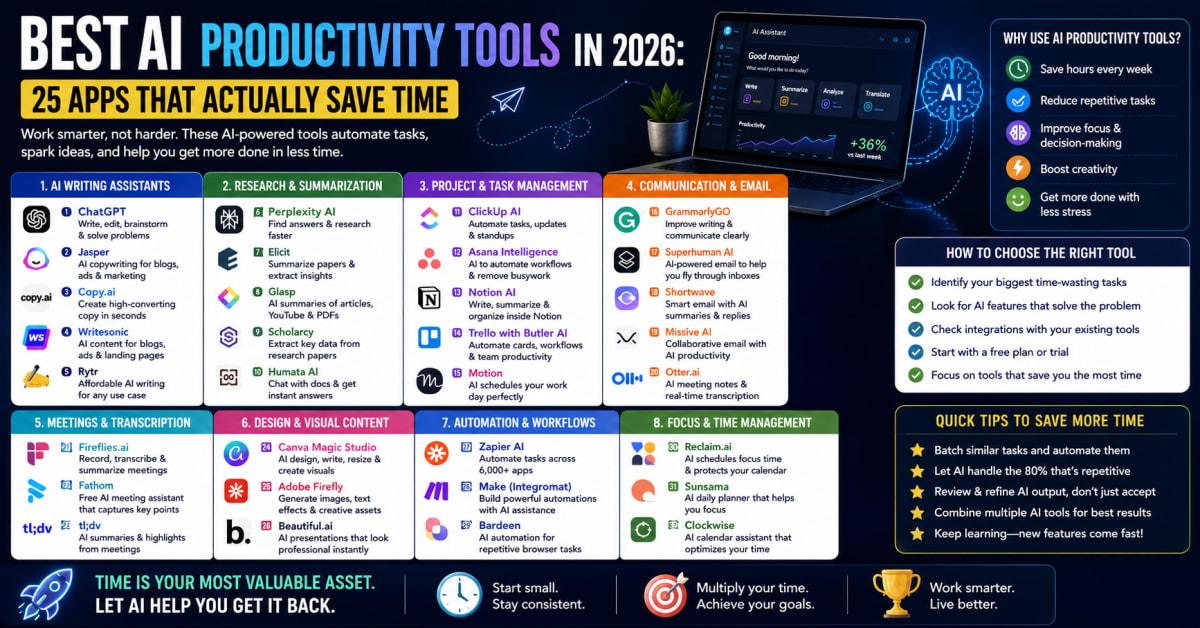
25 Best AI Productivity Tools in 2026 That Save Time
There's an AI tool for almost everything now, which sounds helpful until you're staring at a hundred options trying to figure out which ones actually matter. Most people don't need more tools. They need the right three or four.
This roundup organizes 25 of the best AI productivity tools in 2026 by the specific workflow problem each one solves, not just alphabetically or by hype. You'll find picks for meetings, writing, scheduling, research, automation, design, and more, along with honest notes on where each tool actually earns its place and where it falls short.
AI Productivity Tools — What They Are and Why They Matter
AI productivity tools use machine learning and generative AI to handle tasks that used to eat up hours of manual work, from summarizing meetings to drafting emails to building automated workflows between apps. The best ones solve a specific, recurring friction point rather than promising to do everything.
Choosing well matters because the wrong tool adds another login and another habit to maintain without actually saving time, while the right one can hand back hours every single week.
Why This Is Important Right Now
Picture someone spending thirty minutes after every meeting typing up notes and follow-up emails, only to realize an AI meeting assistant could have generated that summary automatically during the call itself. That gap between available tools and actual adoption is common, mostly because people don't know where to start.
Generative AI adoption among knowledge workers has grown dramatically in a short window, according to major industry surveys. That means using these tools well isn't just a nice-to-have anymore. It's quickly becoming the baseline expectation in many workplaces.
The 25 Best AI Productivity Tools, Organized by Workflow
Rather than one long undifferentiated list, these tools are grouped by the specific problem they solve, so you can jump straight to the category that matches your biggest time sink.
Meetings and Note-Taking
- Fireflies.ai — Automatically records, transcribes, and summarizes meetings, and can search across your entire meeting history for specific topics.
- Granola — A lightweight AI note-taking app that enhances your own typed notes with what was actually said, rather than replacing note-taking entirely.
- Read AI — Generates meeting highlight reels and tracks speaking pace and engagement, useful for teams focused on communication quality.
- Avoma — Combines meeting transcription with conversation intelligence, aimed at sales and customer-facing teams.
Writing and Content
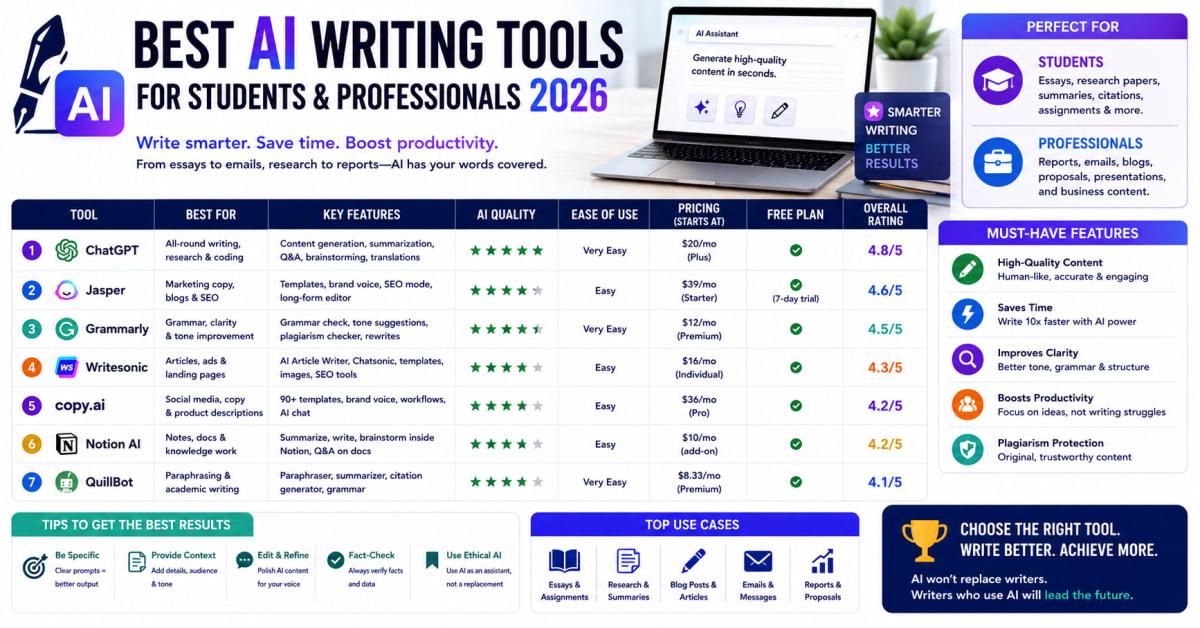
- Claude — Handles longer-form writing, document analysis, and complex reasoning tasks with strong context retention across a conversation.
- Grammarly — Goes beyond spell-check into tone adjustment, clarity suggestions, and full sentence rewrites integrated directly into your writing platform.
- Jasper — Built specifically for marketing content, with brand voice training so output matches your existing style across ads and campaigns.
- Writer — An enterprise-focused writing platform with strong governance and brand consistency features for larger content teams.
Scheduling and Time Management
- Motion — Automatically builds and reorganizes your calendar around priorities, turning a to-do list into time-blocked events.
- Reclaim — Protects focus time and habits on your calendar while flexibly rescheduling around new meeting requests.
- Clockwise — An AI time management tool aimed at teams with shared calendars, helping find meeting times without the back-and-forth.
- Sunsama — Focused on mindful daily planning, giving you a realistic view of what you can actually accomplish rather than an overloaded task list.
Research and Analysis
- Perplexity — Delivers cited, sourced answers pulled from dozens of references, useful for fast, verifiable research.
- Julius AI — An AI data analysis tool that lets you ask questions about spreadsheets and datasets in plain language.
Automation and Workflow
- Zapier — Connects thousands of apps through automated workflows, now with AI-powered Copilot features for building automations from plain-language descriptions.
- Zapier Agents — Extends Zapier's automation into more autonomous, multi-step AI-driven workflows across your connected tools.
Project Management and Organization
- Notion — Combines notes, docs, and project tracking with AI features for summarizing and organizing scattered information.
- Asana — Project management with AI-assisted task prioritization and status summaries for larger teams.
- ClickUp — An all-in-one workspace combining tasks, docs, and goals with built-in AI writing and summarization tools.
- Hive — Project management with AI features aimed at streamlining team collaboration and reporting.
Design and Presentations
- Canva — Its Magic Studio suite turns rough ideas into professional-looking designs and presentations quickly.
- Gamma — Generates full presentations and documents from a simple prompt, with a clean, modern design baseline.
Video and Audio
- Descript — Edits video and audio by editing the transcript directly, removing the need for traditional timeline-based editing for many tasks.
- ElevenLabs — AI voice generation and cloning tools used for voiceovers, dubbing, and audio content production.
- Superhuman Mail — Built around speed, with AI workflows and MCP connectors that let you build automations around your inbox rather than clicking through manually.
Chatbots and General Assistants
- ChatGPT — Remains a flexible, general-purpose assistant for brainstorming, drafting, and quick answers across nearly any task.
Benefits and Real Opportunities
Adopting the right combination of these tools creates compounding value, especially when they work together rather than in isolation.
- Reclaimed hours every week — automating meeting notes, scheduling, and repetitive writing tasks frees up meaningful time for higher-value work.
- Lower cognitive load — offloading routine decisions, like calendar conflicts or first-draft writing, reduces daily decision fatigue.
- Better documentation by default — automatic meeting summaries and transcripts create a searchable record you'd otherwise have to build manually.
- Tools that connect to each other — many of these platforms now integrate directly, letting you chain outputs from one tool into another without manual copying.
Costs and What to Expect
Most tools on this list offer a free tier or trial, though functionality is usually limited by usage volume, like a capped number of meetings or messages per month. Paid plans for individual productivity tools commonly range from around $10 to $30 per user per month, with team and business tiers running higher for advanced features like admin controls or higher usage limits.
Automation platforms like Zapier typically price based on the number of automated tasks run per month, which means costs can scale quickly for heavy users, so it's worth estimating your actual usage before committing to a higher tier. Enterprise-focused writing and design tools often require a custom quote for larger teams needing brand governance or advanced security features.
The hidden cost most people underestimate is switching and setup time. Migrating a workflow into a new tool takes real hours upfront, which is exactly why testing free tiers before committing matters so much.
All-in-One Assistants vs Specialized Single-Purpose Tools vs Automation Platforms: Which One Is Right for You?
| Option | Best For | Pros | Cons |
|---|---|---|---|
| All-in-One Assistants (e.g., ChatGPT, Claude) | People wanting one flexible tool for many different tasks | Extremely versatile and usually cost-effective for varied needs | Often less specialized than a purpose-built tool for a specific task |
| Specialized Single-Purpose Tools (e.g., Fireflies, Motion) | People with one clear, recurring workflow bottleneck | Deep functionality precisely built for that specific problem | Adds another subscription and login to manage |
| Automation Platforms (e.g., Zapier) | People wanting to connect multiple tools into one workflow | Acts as a control center linking your entire tool stack together | Pricing can scale quickly with heavy automation usage |
Who Should Actually Care About AI Productivity Tools?
This matters for knowledge workers juggling constant meetings, freelancers and small business owners wearing multiple hats, and teams looking to reduce repetitive administrative work without adding headcount. It's especially relevant for anyone who's tried one AI tool, found it underwhelming, and assumed the whole category wasn't worth the effort.
Mistakes Most People Make
A few habits keep people from getting real value out of these tools.
Trying to adopt ten tools at once usually leads to abandoning all of them within a few weeks. Starting with one tool tied to your single biggest time sink, then mastering it before adding another, builds a stack that actually sticks.
Assuming one general-purpose chatbot can replace every specialized tool overlooks that purpose-built tools often handle their specific task with more accuracy and fewer errors. Matching the tool to the task, rather than defaulting to one assistant for everything, produces better results.
Committing to an annual plan before testing the free tier can lock you into a tool that doesn't actually fit your workflow. Running the free trial for at least a few real work weeks before upgrading avoids that regret.
Trusting AI output without review, especially for anything client-facing or factual, risks passing along an error you didn't catch. Treating AI output as a strong first draft, not a final answer, keeps quality intact.
What Most Articles Won't Tell You
Most roundups rank tools individually, but the real productivity gain often comes from chaining a few tools together, like feeding a meeting transcript from a note-taking tool directly into a writing assistant to draft follow-up emails automatically.
There's also a detail worth knowing: many of these platforms now support integrations with each other directly, which means your existing tools might already connect to a new one you're considering, saving you from rebuilding a workflow from scratch.
Advanced Moves Worth Knowing
Pairing a meeting transcription tool with a writing assistant creates a simple but powerful pipeline: capture the conversation automatically, then have the writing tool draft summaries or follow-ups from that transcript without manual re-typing.
Reviewing your tool stack every few months, rather than assuming your initial picks are permanent, keeps you from overpaying for a tool that's since been outpaced by a newer, better-fitting option in a fast-moving category.
Frequently Asked Questions
Do I need to use all 25 of these AI productivity tools?
No, not at all. Most professionals get the most value from just two or three tools that address their specific biggest time sinks, rather than adopting the entire list.
Which AI productivity tool is best for someone just getting started?
A general-purpose assistant like ChatGPT or Claude is often the easiest starting point, since it can help with a wide range of tasks while you figure out which specific workflow bottleneck deserves a specialized tool next.
Are free versions of these AI tools actually useful, or just marketing?
Many free tiers are genuinely useful for light usage, though most cap features like the number of meetings transcribed or messages sent per month. They're a reasonable way to test fit before committing to a paid plan.
Can these AI tools replace human judgment entirely?
No, these tools are designed to speed up and support work, not replace critical thinking or review. Checking AI-generated output before sending it out remains an important step regardless of which tool you use.
How often should I reevaluate my AI productivity tool stack?
Checking in every few months is reasonable, given how quickly this category evolves. A tool that was the best option a year ago may have since been outpaced by a newer, more specialized alternative.
The Bottom Line on AI Productivity Tools in 2026
The best AI productivity tools in 2026 aren't the ones with the longest feature list. They're the ones that remove friction from a problem you actually have. Start with your biggest time sink, whether that's meetings, scheduling, or repetitive writing, and pick one tool built specifically for that job. Test the free tier, master it, and only add another tool once a new bottleneck clearly emerges. That approach beats adopting a dozen tools you'll use once and forget.
Read Next
AI Agents in 2026: How They're Transforming Work
Open Banking in 2026: How It Works & What's Next
How AI Is Changing Personal Finance in 2026
Best AI Writing Tools for Students & Professionals 2026
Best AI Resume Builders in 2026 to Land More Interviews